Writing Rules That Work
A Playbook is only as good as its rules. The AI applies them literally, so a vague rule produces vague output and a precise rule produces precise output. This chapter explains how to write rules that behave consistently across every contract you run them against.
You don't have to write rules from scratch
Before getting into structure and technique, the most important thing to know is that you don't need to be a prompt engineer to write good rules.
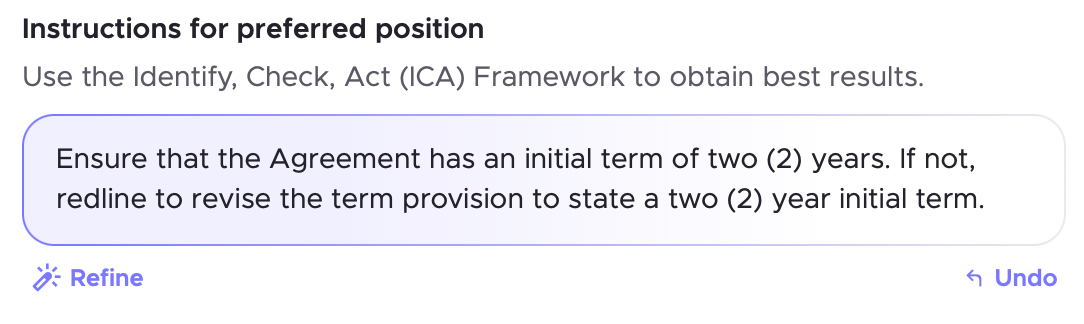
Every rule has an Improve Instruction button. Write what you want in plain English, press the button, and the AI will rewrite your instruction into a form it can apply reliably. You can then review the improved version, adjust it if needed, and save it.
This means you can start with something like:
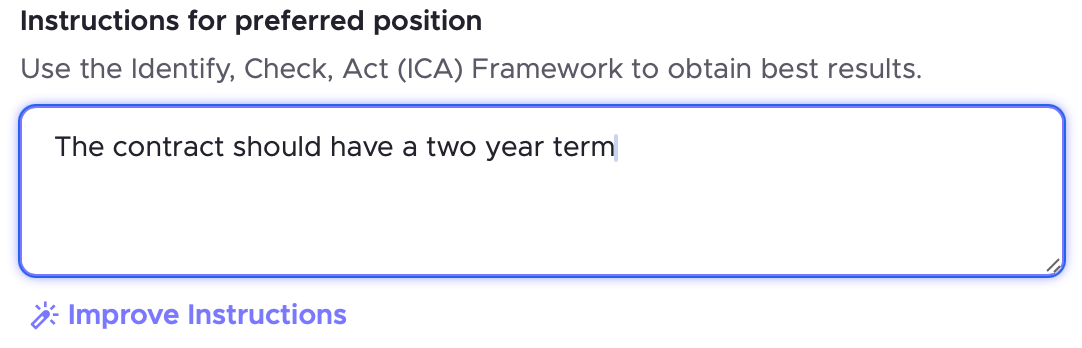
Press Improve Instruction, and get back something the AI can actually work with. The button handles the translation. Your job is to know what you want, not to know how to phrase it for an AI.
The structure every good rule follows
When you do write or edit rules directly, one pattern works better than any other:
Ensure that [requirement]. If not, [action].
Examples:
"Ensure that governing law is English law. If not, redline to English law."
"Ensure that the liability cap is no less than 12 months' fees. If lower or unlimited, redline to increase the cap."
"Ensure that the confidentiality clause includes standard exclusions for information in the public domain. If not, redline to add them."
This structure works because it sets a clear requirement and tells the AI exactly what to do when that requirement isn't met. There is no ambiguity about what to look for or how to respond.
One rule, one issue
Each rule should cover exactly one issue. When you put multiple checks into a single rule, the AI may only catch some of them.
❌ "Ensure that liability is capped at 12 months' fees, indemnity excludes indirect damages, and governing law is English law."
✅ Three separate rules, one for each issue.
If you find yourself writing "and" in a rule instruction, split it into two separate rules.
Use boundaries, not permissions
Frame requirements as limits rather than acceptances. The AI applies bright lines more reliably than it interprets permissions.
❌ "Accept a liability cap of 12 months' fees."
✅ "Ensure that liability is capped at no more than 12 months' fees. If above that, redline to reduce it."
The first version invites interpretation. The second sets a clear boundary the AI can test against.
Avoid subjective language
Words like "reasonable," "appropriate," "fair," and "sufficient" mean different things in different contexts. The AI cannot interpret them consistently. Replace them with specific thresholds or defined outcomes.
❌ "Ensure that payment terms are commercially reasonable."
✅ "Ensure that payment terms are no more than 30 days. If longer, redline to 30 days."
❌ "Ensure that the notice period is appropriate."
✅ "Ensure that the notice period is at least 30 days. If shorter, redline to 30 days."
Rule types for different situations
Standard rule
The most common type. A clear requirement with a clear action.
"Ensure that the agreement includes a mutual termination for convenience right with no less than 30 days' notice. If not, redline to add it."
Carve-out rule
Use when a general position has a specific exception that should be treated as acceptable.
"Ensure that indemnification does not cover indirect or consequential damages, except that if indirect damages are limited to confidentiality breaches only, this is acceptable. If not, redline to exclude indirect damages."
Boundary rule
Use when you need to enforce an upper or lower limit.
"Ensure that the auto-renewal notice period is at least 60 days. If shorter, redline to 60 days."
Conditional rule
Use when the requirement only applies if a certain condition exists in the contract.
"If the agreement includes an auto-renewal clause, ensure there is an opt-out notice period of at least 60 days. If not, redline to add it."
Variable rule
Use when the correct answer depends on deal-specific information the AI cannot determine from the document alone. Set these as Red Flags rather than Redlines.
"Ensure that the party names and entity details are correct throughout the agreement. Flag for review."
Redlines vs Red Flags
Every rule produces one of two output types. Choosing the right one is as important as writing the rule itself.
Redline — the AI proposes a tracked change directly in the document. Use this when the fix is predictable and you are confident the AI can draft the correct language.
"Ensure that governing law is English law. If not, redline to English law."
Red Flag — the AI surfaces the issue for your attention without making a change. Use this when the right answer depends on context, judgment, or deal-specific information.
"If the agreement grants exclusivity, flag for review by Legal."
A good rule of thumb: if you can write the correct outcome into the rule, use a Redline. If the outcome depends on something the AI cannot see in the document, use a Red Flag.
Adding fallback positions
A fallback is a secondary position the AI can apply if the counterparty pushes back on your preferred position. You add fallbacks directly to a rule.
Example:
Preferred: "Ensure that liability is capped at 12 months' fees. If not, redline to 12 months."
Fallback: "If 12 months is rejected, accept 6 months' fees as a fallback."
When you run the Playbook, both positions are surfaced. You choose which one to apply based on where the negotiation stands.
Adding comments and guidance notes
Comments appear in the margins of the contract when a Redline or Red Flag is applied. They are visible to the counterparty and explain why a change has been made. Keep them professional and concise.
"Liability cap revised to align with our standard position across all supplier agreements."
Guidance notes are internal. They appear alongside the rule output and are visible to your team but not to the counterparty. Use them to explain the rationale for a rule, set out which fallback to choose and when, or flag when something should be escalated.
"If the counterparty resists the liability cap, escalate to the Legal Director before agreeing to any position below 6 months."
Guidance notes turn a Playbook into more than a review tool. They carry institutional knowledge about how to handle specific issues, so whoever runs the review has the context they need to make good decisions.
A quick checklist before saving a rule
- Does it start with "Ensure that"?
- Does it contain only one check?
- Does it specify what to do if the requirement is not met?
- Does it use a specific threshold rather than a subjective word like "reasonable"?
- Is it a Redline or a Red Flag, and is that the right choice for this issue?
If yes to all five, the rule is ready.
Next chapter → Running a Playbook and Working With the Output